

Traditional Scams
Most scams start with flashing lights and a phone number directing the user to call a customer support number. The agent on the other end of the phone walks the person being scammed through the process of installing a remote access utility and then takes control of the computer. Usually it takes the scammer a little time on the phone and some potential resistance before they gain access to the account. I’ve heard many of these calls last several hours.
Unfortunately almost all scams have historically relied on user interaction. In other words, the person being scammed has to explicitly download, install and authenticate the remote access software for the scam to continue. The scammer usually has the person download and install different utilities until one works.
The scam artist is instructing the person being scammed to navigate the computer and log into bank accounts and other accounts. In the majority of cases the scam can only happen with both parties actively leading and one naively following. Scams of this type could have been stopped if the person being scammed was a little more perceptive.
A More Sophisticated Scam
There’s a new scam in town that doesn’t require as much hands on by the victim. In fact, all it takes is one click to initiate and the scammer has full access to the target computer. It starts with some clever social manipulation and a download link. Once downloaded and clicked on, the attachment installs one of several utilities which gives hackers instant access to the compromised computer. With this instant access bank accounts can be emptied in minutes.
Since I noticed this about a week ago I’ve removed it from about six computers. It’s one of the more dangerous versions of scamming because it doesn’t require anything more than the victim click on the file. Instead of the promised IRS paperwork or tax documents, it installs a payload behind the scenes and doesn’t require interaction with the victim that opens the computer instantly to scammers.
Even With My Experience The First One Stumped Me
The first one of these I saw puzzled me. Yes, many thousands of scams I’ve removed and this was on my desk for hours the other day. The customer told me they had money taken from their account so there was evidence they had been scammed. None of the traditional utilities like Ultraviewer or ClientConnect were installed. I couldn’t find anything running in Windows services or that suggested there was active remote access software.

It wasn’t until I right clicked the files in the download folder to delete when I saw the uninstall command. Why did they (and how did they) go through the process of creating a sophisticated location path for the software to run and operate from? I decided to backup the drive at this point so I could recreate it later on. Clicking on uninstall revealed the underlying software for this computer was NinjaRMM a rather powerful remote management utility.
The unique part of this is the file path, or location, the program was installed into. In this case the fake file name was IRS_Paperwork.pdf. The program location was \IRS_Paperwork.pdf\ninjarmm.exe. That means the creator of this utility stuffed the program into another file. The process the creator used is sometimes called data masking or stitching, basically combining two files or masking one to look like another.
From The Victim’s Perspective
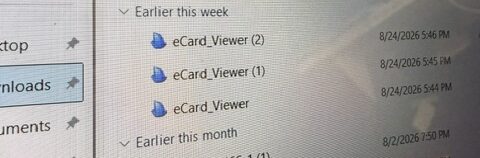
The person receives an official looking email with an attachment. Out of curiosity the user opens the email and clicks the file. From a phone or tablet not running Windows, they are presented with a message that says the file can’t be opened on this device. Their next logical step is to login to email from a computer and click the file. When nothing happens they click several more times and still nothing happens. Every computer I’ve removed this from has had the same download many times in a row – presumably to find a good version.
How the Software is Installed
Clicking the file starts the process of installing one of two utilities that I’ve discovered so far. Either NinjaRMM will install of something called Ninite – ironically from a company called Secure By Design. As I mentioned earlier, the software is blindly and quietly installed into the masked file location and doesn’t run services as normal Windows software does. My belief is the creators have developed these titles into portable applications that don’t require traditional installation.
The Hack Starts Almost Instantly and Without Notice
Scariest of all is the hack. I wouldn’t call this a scam because the hack occurs minutes after receiving the file and failing to open it. My customers have reported the time stamps of fraudulent bank transactions and account withdrawals happen within minutes of downloading the files. At first I postulated the software was automating the hack process until I thought about the social manipulation.
Here’s what I think is happening behind the scenes. It’s really basic and based on the types of accounts, how the money was moved and the timing I concluded it wasn’t the software or some type of AI mechanism. There are real people behind the process:
- A person or computer sends out thousands of targeted emails
- Call centers of hackers are waiting for invitations from infected computers to start coming back to them
- Each hacker takes one compromised computer at a time using saved passwords to access and manipulate accounts
- Once the accounts are flushed and they run out of incoming signals they start the process again
Efficiency Makes This Dangerous
Rather than pay call center employees to sit around and wait for phone calls, it’s much more productive to have people wait for predictable computer generated invitations. This process removes many of the human factors like suspicion or the lack of skills the victim has to install remote access software. Plus not having someone on the other end of the phone asking questions allows the scammers or hackers to spend more time under the radar collecting account information.
From the hacker’s perspective the most important part is using the victim’s computer to access accounts remotely. For most of us who use online banking, the bank or financial institution remembers our digital identity and may not ask for a password. If, on the other hand, the hacker used their own computer in some other part of the world, they would be forced to use two factor authentication or some other challenge which would make the scam impossible.

Perpetuating the scam only requires sending out a fresh batch of emails. Nothing more. These agencies are sophisticated enough to predict the percentage of results they’ll get from each batch that goes out.
How to Prevent Being Hacked
The takeaway from this is to really pay attention to any odd emails you receive and not to click on anything you don’t recognize. If you’re not expecting an email attachment don’t click on it. If you recognize the sender (as one of my customers did) and you’re not expecting anything from them then reach out by phone and ask them what they sent. We all have to do our due diligence to defend ourselves against this new type of scam.
by Jeromy Patriquin, President of Laptop & Computer Repair, Inc. You can reach me by cell at (978) 413-2840